
Flying Meat's Acorn 8 delivers professional image editing for Mac without the subscription trap or complexity of heavyweight alternatives. The app runs natively on Apple Silicon and supports macOS 26 Tahoe while maintaining the straightforward interface that made earlier versions popular with Mac users who want powerful editing tools without months of training.
Acorn 8 introduces several features that bring it closer to enterprise-level editors while keeping the app approachable. AI Subject Selection uses machine learning to identify and isolate subjects in photos automatically, which saves considerable time compared to manual selection methods. The Live Text tool detects text in images and copies it directly to the clipboard, turning photos of documents or screenshots into editable text without external OCR software.
Data-driven graphics through the Data Merge feature let you import CSV files to populate text boxes and images across projects, which streamlines creating multiple variations of designs like name tags or social media graphics. The on-canvas ruler measures in pixels, inches, or centimeters and includes straightening controls for correcting tilted images. JPEG-XL support adds import and export capabilities for this newer compression format that maintains quality while reducing file sizes.
Super Resolution ML Image Resizing uses machine learning to enlarge images while preserving detail and clarity. The feature works particularly well when preparing images for print or presentations where the original resolution falls short. Results typically show better edge definition and fewer artifacts compared to traditional upscaling methods.
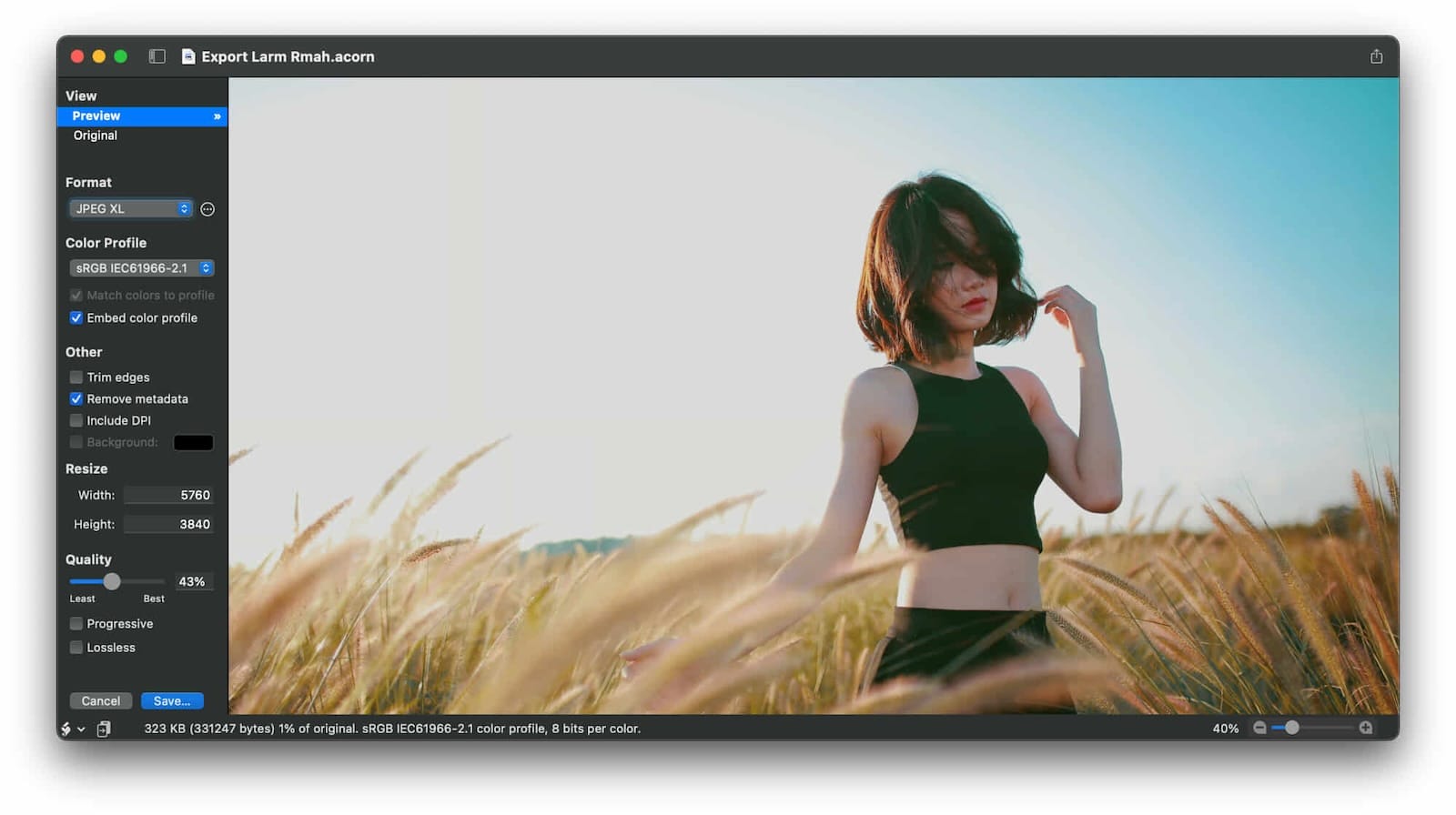
The Über Export window provides real-time preview while adjusting size, quality, and compression settings. Custom presets save your preferred export configurations, which becomes valuable when preparing images for different platforms or clients with specific requirements. The window supports PNG, JPEG, GIF animation, WebP, and many other formats including layered PSD exports.
Apple Shortcuts integration expanded in version 8 to include more automation options. You can build workflows that apply filters, crop images, resize batches, rotate photos, add watermarks, or replace text without opening the app manually. These shortcuts work system-wide and connect with other Mac automation tools.




Affiliate disclosure: some links in this article are Amazon Associate links. If you buy through them, Next Level Mac may earn a small commission at no extra cost to you, and we only recommend products that genuinely bring value to your Mac setup.
Working with precision in Acorn 8 becomes more intuitive when using a graphics tablet instead of a mouse or trackpad. The pen provides natural control for selection work, masking, and brush-based edits. This is where to buy the Wacom Intuos Small Graphics Drawing Tablet (Amazon Affiliate Link): https://www.amazon.com/dp/B079HL9YSF?tag=nextlevelmac-20
The tablet connects to any Mac via USB and offers 4,096 pressure levels with tilt recognition. Four customizable ExpressKeys provide quick access to frequently used commands within Acorn or other creative software. The compact footprint works well on crowded desks or for users who travel between workspaces.
Layered screenshots in Acorn capture every window on your Mac as separate layers in a single image file, which makes creating tutorials or documentation faster since you can rearrange or hide windows after capture. Timed captures and AppleScript support extend these capabilities for specific workflows.
The Perspective Fix and Crop tool addresses distortion in architectural photography or scanned documents. A grid overlay helps align corrections visually, and the tool preserves image quality while correcting problematic angles. Cropping simultaneously with perspective correction saves steps when preparing images for publication.
Non-destructive curves and levels adjustments let you modify tonal response and color channels without permanently altering the original image data. Presets speed up common corrections, and the adjustments stack with other non-destructive filters for complex editing chains that remain fully reversible.
Vector tools include stars, arrows, Bézier curves, and boolean operations that combine shapes through union, intersect, difference, exclude, and divide functions. Text follows paths or wraps around circles with on-canvas controls for radius, rotation, and baseline adjustment. These vectors remain editable and can export as SVG files for use in other applications.
Clone tool improvements allow cloning across different images, layers, or even from group and shape layers. Holding shift converts the clone tool to a stamp tool for repeated patterns. Brush softness and flow adjust through the inspector palette for precise control over how cloned content blends with surrounding areas.
Smart Layer Export automates slice-like functionality with configurable settings per layer. The movable frame defines export bounds, and the system automatically generates files at 1x, 2x, 3x, 4x, or 5x sizes with proper naming conventions for different screen densities. This feature streamlines preparing assets for iOS, iPadOS, or web projects.
Color accuracy matters significantly when editing images professionally or preparing them for print. The X-Rite ColorChecker Passport Photo 2 combines four photographic targets in a protective case that adjusts to any scene. Where you can get the X-Rite ColorChecker Passport Photo 2 (Amazon Affiliate Link): https://www.amazon.com/dp/B07PNCPZ8G?tag=nextlevelmac-20
The targets include creative enhancement patches, the classic ColorChecker reference, white balance calibration, and additional tools for exposure and color shift evaluation. Software included with the passport creates custom DNG and ICC camera profiles based on your specific camera, lens, and lighting combinations. These profiles ensure Acorn displays colors accurately when editing RAW or JPEG images.
Look up tables in Acorn 8 apply color grading and visual styling instantly. Pre-designed LUTs create cinematic tones, vibrant color shifts, or custom looks with minimal adjustment. The feature works particularly well for establishing consistent visual style across photo series or matching video footage aesthetics.
Animated GIF and PNG export saves all layers as animation frames with control over playback speed. You can open existing animated images, modify individual frames, or apply filters to frame ranges. The export window shows real-time preview of the animation with adjustable frame rates.
RAW image import handles high-resolution images from digital cameras with support for 32-bit, 64-bit, or 128-bit color depth per component. This preserves the full dynamic range and color information captured by the camera sensor, providing maximum flexibility during editing.
Flood fill offers contiguous and non-contiguous modes with adjustable tolerance using on-canvas controls. Smooth edge options ensure clean fills without harsh boundaries. The tool works across layers or within selections for targeted color replacement.
Shape processors apply non-destructive filters specifically to shape layers, allowing movement, adjustment, and generation of vector elements without permanently modifying them. These processors stack like regular filters for complex effects that remain fully editable.
Batch editing through Automator connects Acorn to Mac automation workflows for processing multiple images with consistent settings. Operations include watermarking, scaling, trimming, exporting, cropping, and filter application across entire folders of images.
Managing large image libraries and project files becomes easier with fast external storage. The Samsung T7 Portable SSD delivers read and write speeds up to 1,050 and 1,000 MB per second through USB 3.2 Gen 2 connectivity. Here's where to get the Samsung T7 Portable SSD 1TB (Amazon Affiliate Link): https://www.amazon.com/dp/B0874XN4D8?tag=nextlevelmac-20
The drive weighs two ounces and measures roughly the size of a credit card, making it practical for travel between home and studio or office. Aluminum construction provides shock resistance up to six-foot drops. Both USB-C to USB-C and USB-C to USB-A cables come included for compatibility with different Mac models. The T7 works with macOS, Windows, Android devices, and gaming consoles without requiring reformatting between platforms in most cases.
Layer masks in Acorn block unwanted areas or expose layers beneath the current layer. The mask blend mode uses your layer to clip layers underneath. Layer transparency locks through mask application for precise editing within existing shapes.
Custom brush creation through the brush designer lets you modify existing brushes or build new ones from scratch. Adjustments include flow, softness, scatter, jitter, and rotation. Test strokes update instantly as settings change, providing immediate feedback during brush development.
The command bar accessed through File menu or Command-Shift-O shortcut opens a text window for finding menu commands, accessing hidden commands, or searching help documentation. The feature speeds up workflow once you memorize key command names and reduces time spent navigating menus.
Photoshop brush import supports .abr files through drag and drop onto the Acorn dock icon. The imported brushes become available immediately within the brush palette alongside Acorn's native brushes.
Boolean shape operations create complex vectors by combining multiple shapes through union, intersect, difference, exclude, or divide operations. The results remain editable as vector objects that scale without quality loss.
Multi-stop gradients extend beyond simple two-color fades with unlimited color stops positioned along the gradient path. Saved gradients become available across projects for consistent color schemes.
Instant alpha removes backgrounds and unwanted pixels quickly through tolerance-based selection. The eraser tool options make background removal straightforward even in complex images.
New View window displays your image at 100 percent zoom while you work at any zoom level in the main canvas. This eliminates constantly zooming in and out to check detail quality during editing sessions.
Acorn's .acorn file format saves all layers, effects, and settings in a single file. The format opens in future versions and preserves complete editing history. Export options include JPEG, PNG, GIF, HEIC, WebP, BMP, TIFF, PSD with or without layers, PDF, SVG, and more. CMYK TIFF exports support up to 128 bits per pixel for commercial printing workflows.
Flying Meat has developed Acorn for Mac since before the App Store existed, refining the interface and features through continuous updates. The company received recognition as an App Store Awards finalist in 2025 and previously won Macworld's Eddy Award along with Editors' Choice designation. The app requires macOS 14 Sonoma or later and runs as a universal binary on both Intel and Apple Silicon Macs. Older versions remain available for users running earlier macOS releases.
The software purchases as a one-time license with no subscription fees. Updates within major versions arrive free, and the company maintains active support through email and forums. A 14-day free trial provides full functionality for evaluation before purchase.
Acorn 8 fits workflows ranging from casual photo touch-ups to professional graphic design. The combination of approachable interface and powerful features makes it effective for Mac users who need image editing capabilities without the complexity or cost structure of enterprise alternatives. The app integrates naturally with macOS features and respects the platform's design conventions while providing tools sufficient for serious creative work.

Related Posts
Is your Wi-Fi Speed Test LYING To You? Here's How to Find Out
Jan 17, 2026
Turn Your MacBook Into a Touchscreen With the Intricuit Magic Screen
Jan 07, 2026
Mac PDF Editing: Native Tools and Pro App Workflows
Dec 29, 2025