
I love flying. I never cease to be awed by seeing the world from the point of view that only being 30,000{ feet in the air can give.
But I don't like dealiing with the TSA. It's not even the long lines and strict policies they enforce. Let's just say most of my experiences dealing with them interpersonally haven't left me with a positive impression.
So anything that can make getting through the unpleasantness of the TSA to get on with the joy of travel is a plus in my book. I think Apple has come up with something for us iPhone owners that can help.
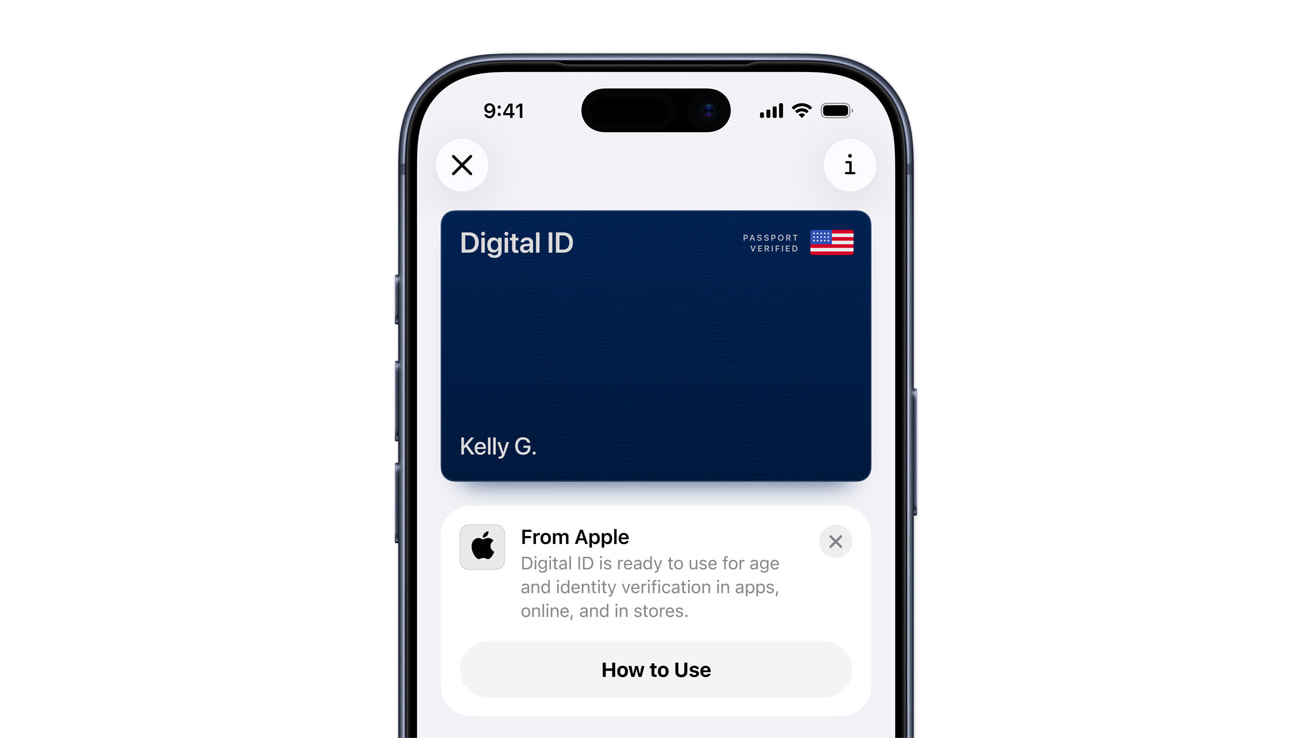
Apple just rolled out Digital ID for Apple Wallet in the
United States. It lets eligible travelers create a secure, phone-based ID from a U.S. passport and present it at TSA checkpoints for domestic flights.
Digital ID is optional. It doesn’t replace a physical passport for international travel or border control. Think of it as a faster, contactless way to verify identity at the airport.
What Digital ID actually is
Digital ID stores select passport data on the device after an encrypted setup. Setup includes scanning the passport and a live selfie check to confirm identity. All processing uses Wallet security and on-device protections.
At launch, TSA acceptance begins in beta at more than 250 U.S. airports for in-person identity checks during domestic travel. Additional use cases may arrive later as readers roll out.
What Digital ID is not
It is not a substitute for showing a passport at immigration or when crossing borders. Keep the physical passport for those scenarios.
It also does not automatically work everywhere IDs are required. Acceptance depends on TSA and participating locations as they come online.
Eligibility and requirements
Digital ID requires a supported iPhone or Apple Watch and a valid U.S. passport. The feature appears in Wallet as an option to add an ID.
If a state ID or driver’s license is already in Wallet, Digital ID shows up as a separate card. The consent flow uses Face ID or Touch ID.
How to set it up
Open Wallet, tap the add-card button, choose ID, and follow the instructions to scan the passport and perform the live selfie check. Plan on a few minutes in good lighting.
If the scan fails, try a flat, non-glossy surface under the passport page. Keep the phone steady while the NFC scan reads the embedded chip.
Using Digital ID at TSA
Before the checkpoint, double-click the side button to open Wallet. Select Digital ID, then hold iPhone or Apple Watch near the identity reader. Approve what data is shared and authenticate when prompted.
Expect this to feel similar to Apple Pay. You don’t hand the phone to the officer. The reader pulls only the fields required for verification.
Privacy and security notes
Digital ID data is encrypted and stored on device. Adding an ID requires a live photo, and you choose what fields to share at presentation time.
If your phone is lost, your device passcode and Find My still apply. You can mark the device as lost and remotely wipe Wallet contents.
Real-world tips for a smoother trip
Enroll at home instead of the airport. You’ll want time and steady lighting for the scan. You also don't want to show off your personal information to strangers during the signup, nor do you want to use public WiFi while setting things up.
Add both your state ID and Digital ID if you’re eligible. That gives flexibility when an airport or lane supports one method before the other.
Keep the physical passport with you anyway. Airports can vary, and a supervisor may still ask to see it.
Travel-friendly accessories that pair well with Digital ID


If you’re moving through airports faster, tracking bags becomes even more useful. A 4-pack of AirTags covers a carry-on, checked bag, backpack, and keys, all in the Find My app.
Here’s where you can buy the Apple AirTag 4 Pack (Amazon Affiliate Link):
https://www.amazon.com/dp/B0D54JZTHY?tag=nextlevelmac-20&gbOpenExternal=1
Frequent flyers benefit from a tiny USB-C charger that handles an iPhone and iPad with one brick. Anker’s 30W Nano fits easily in a jacket pocket and supports fast charging for modern iPhones and many tablets.
Where you can purchase the Anker Nano 30W USB-C Charger (Amazon Affiliate Link):
https://www.amazon.com/dp/B0B2MLRF93?tag=nextlevelmac-20&gbOpenExternal=1
What to expect at the airport
Availability is rolling out airport by airport. PreCheck lanes support Digital ID where identity readers have been installed, but coverage will vary during the beta. A physical ID is still smart to carry as a backup.
Who can use it in a group
Each traveler needs an individual Digital ID. Identity documents are personal, so there is no sharing or family pass. Plan extra time if multiple people in a group are setting up for the first time.
Where it works today
Digital ID is designed for domestic travel at TSA checkpoints in the United States. It is not accepted for immigration or border control. Bring the physical passport whenever a border crossing is involved.
What’s next
Apple indicates acceptance will grow as more readers come online. Expansion to additional venues is possible as standards mature and partners adopt the technology. For now, airports are the focus.
One more thing
I'm a strong believer in redundancy.The worst thing that can happen while you are traveling is for your iPhone to be lost or stolen and for you to have relied solely on it for your identification needs.
Always bring physical copies of your ID documents alongside your iPhone and/or Apple Watch.Don't rely solely on those devices. Remember that this program is currently in beta, and not all TSA checkpoints are currently using it.
If there's one unwavering truth, it's that the government is the last to embrace change and adopt technology. Don't count on them to know how to use this beta program even if they say that it's supported at their checkpoint at your airport.
I'm not knocking the government here. I'm just making sure you have what you need when you travel so you're not slowed down or inconvenienced. Travel should be as fun and hassle-free as possible.
Someone, somewhere, is waiting for you to arrive, and they're going to be excited to see you when you get there. By being prepared before you get to the airport and go through the TSA checkpoint, you'll get there faster and easier, and start spending time sooner with the people that matter most to you.

Related Posts
iPhone 17 Screen Protectors: Why Anti-Reflective Coating Matters
Dec 06, 2025
Master iPhone Automation: The Ultimate NFC Tag Guide (2026)
Dec 05, 2025
Free Up Your iPhone Storage in IOS 26
Dec 05, 2025