
You have probably been there before. Your iPhone hits 10 percent halfway through a travel day, you are nowhere near an outlet, and you start rationing every notification like it is the last drop of water in a desert. A good power bank fixes that problem entirely, and the right one can keep your entire Apple setup running for days away from the wall.
Choosing a portable charger used to be straightforward. You picked a capacity, checked that it had the right ports, and called it a day. Now the landscape is more complicated. Power Delivery protocols, pass-through charging, wattage ratings, and airline regulations all factor into which power bank actually fits your life. I want to cut through the noise and help you find a portable charger that matches how you actually use your Apple gear.
Why capacity and wattage both matter
When you shop for power banks, you will see two numbers that matter most: capacity measured in milliamp hours (mAh) and output measured in watts (W). They tell you different things.
Capacity determines how many times you can recharge your devices before the power bank itself needs to be refilled. A 10,000mAh power bank can charge an iPhone 17 roughly twice from empty. A 20,000mAh unit gets you closer to four full charges. For iPad and MacBook users, you need even more capacity because those batteries are substantially larger.
Wattage determines how fast the power bank can deliver that stored energy. A 10W output will charge your iPhone slowly, similar to the old 5W cube. A 20W output matches Apple's standard fast charging speed. Once you get into 30W, 45W, or higher territory, you can charge iPads quickly and even run certain MacBooks while you work.
The sweet spot for most Apple users falls somewhere in the 20,000mAh to 27,000mAh range with at least 45W output. That gives you enough capacity for multiple days of phone charging plus enough power to meaningfully charge an iPad or keep a MacBook Air topped up during a long flight.
Airline regulations you need to know
Before you buy the biggest power bank you can find, there is a hard limit to consider. Airlines restrict lithium-ion batteries to 100 watt-hours (Wh) for carry-on luggage. Anything above that requires airline approval, and batteries over 160Wh are banned from commercial flights entirely.
To calculate watt-hours, multiply the capacity in amp-hours by the voltage. A 27,000mAh power bank at 3.7V nominal voltage works out to roughly 99.9Wh, which squeaks under the limit. Most reputable power bank manufacturers design their high-capacity units to land just below 100Wh specifically for this reason.
Power banks must travel in your carry-on bag, not checked luggage. TSA and international equivalents are strict about this rule because lithium batteries in the cargo hold pose a fire risk that crew cannot address. Keep your power bank accessible in your personal item or backpack, and you will breeze through security without issues.
Affiliate disclosure: some links in this article are Amazon Associate links. If you buy through them, Next Level Mac may earn a small commission at no extra cost to you, and we only recommend products that genuinely bring value to your Apple setup.
High-capacity option for serious travelers
If you regularly find yourself away from outlets for extended periods, whether that means long flights, camping trips, conference days, or working from coffee shops with limited seating near plugs, a high-capacity power bank with laptop-grade output makes life substantially easier.
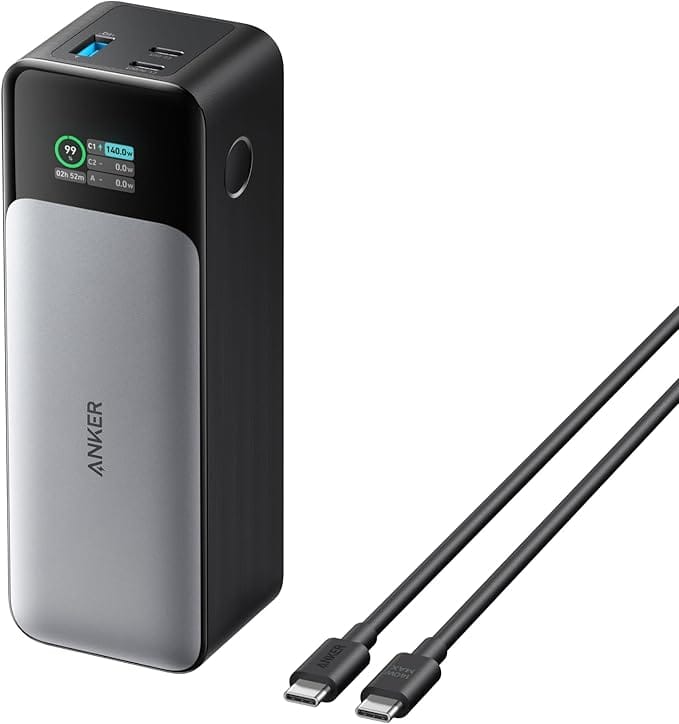
The Anker 737 Power Bank packs 24,000mAh of capacity into an airline-friendly package that stays under the 100Wh limit. What sets it apart from cheaper alternatives is the 140W maximum output through USB-C Power Delivery 3.1. That is enough power to fast charge an iPhone 17 Pro, run a MacBook Air at full speed, or quickly top up an iPad Pro.
The 737 includes three ports: two USB-C and one USB-A. When you connect a single device to the primary USB-C port, you get the full 140W output. Connect multiple devices and the power bank intelligently distributes power across them. The smart digital display on the front shows real-time input and output wattage plus an estimate of how long until the power bank itself is fully recharged.
For iPhone users specifically, this power bank can charge an iPhone 17 Pro roughly four times from empty. For MacBook Air users, you can expect roughly 1.3 full charges, which translates to several extra hours of work time. The included 140W USB-C cable handles the full output speed, though you will need a high-wattage wall charger to refill the power bank quickly. With a 140W charger, you can go from empty to full in about an hour.
Where you can get the Anker 737 Power Bank with 24,000mAh capacity and 140W output for charging iPhone, iPad, and MacBook (Amazon Affiliate Link): https://www.amazon.com/dp/B09VPHVT2Z?tag=nextlevelmac-20&gbOpenExternal=1
Matching the right cable to your power bank
A power bank is only as good as the cable connecting it to your devices. This sounds obvious, but it catches people off guard more often than you might expect. Not every USB-C cable can handle high wattages, and using an underpowered cable with a capable power bank leaves performance on the table.
For charging iPhones and iPads at their maximum supported speeds, any USB-C cable rated for 60W or higher will work fine. The iPhone 17 lineup tops out around 40W wired, and iPads peak around 30W to 35W depending on the model. A standard 60W cable handles both scenarios comfortably.
For MacBook charging, you need cables rated for higher wattages. The MacBook Air charges at up to 67W with a compatible charger, while MacBook Pro models can draw 96W to 140W depending on the configuration. If your cable is only rated for 60W, your MacBook will charge slowly even when connected to a 140W power bank.
The safest approach is to carry at least one cable rated for 100W or higher. These cables use internal electronics called e-markers that communicate power requirements between devices, ensuring safe and stable charging at high wattages. A 100W cable works perfectly for every Apple device you own, from AirPods to the largest MacBook Pro.
Anker's 100W USB-C cables are a reliable choice that will not break the bank. They feature a durable nylon exterior rated for 5,000 bends, which matters when cables live crammed in bags and pockets. The 10-foot length gives you flexibility to charge from awkward outlet positions in airports, hotels, and coffee shops without sitting on the floor next to the wall.
This is where to buy the Anker USB-C to USB-C Cable with 100W fast charging support for iPhone, iPad, and MacBook (Amazon Affiliate Link): https://www.amazon.com/dp/B08PVPTNZL?tag=nextlevelmac-20&gbOpenExternal=1
How to actually use a power bank effectively
Owning a power bank and using it well are different things. A few habits will help you get more value from your portable charger.
First, keep the power bank itself charged. This sounds obvious, but it is the most common failure point. A dead power bank in your bag helps nobody. I keep mine plugged into a charger on my desk when I am home, so it is always ready to grab on the way out the door. Some power banks support pass-through charging, which means you can charge the power bank and your phone simultaneously from a single wall outlet. This is useful in hotels where outlets are scarce.
Second, top up your devices opportunistically rather than waiting until they hit critical levels. If your iPhone is at 60 percent and you have a few hours of heavy use ahead, plug it into the power bank for 20 minutes while you are sitting somewhere. Getting back to 90 percent takes much less energy than going from 10 percent to full, and you avoid the stress of watching the battery icon turn red.
Third, understand that power banks lose efficiency during the charging process. A 24,000mAh power bank does not deliver 24,000mAh to your devices. Some energy is lost as heat during voltage conversion, and the power bank's own circuitry consumes a small amount. Real-world efficiency typically falls between 80 and 90 percent. Plan accordingly when estimating how many charges you will get.
Fourth, store your power bank properly. Lithium batteries do not like extreme temperatures. Leaving a power bank in a hot car or cold garage accelerates degradation. Room temperature storage with the battery between 40 and 80 percent charge is ideal for long-term health if you will not be using it for a while.
When a smaller power bank makes more sense
Not everyone needs a 24,000mAh beast. If you primarily use your power bank as insurance against unexpected battery drain rather than as a primary power source for multi-day trips, a smaller unit might fit your life better.
A 10,000mAh power bank weighs roughly half as much as a 20,000mAh unit and takes up less space in your bag. It provides one to two full iPhone charges, which is enough to get through most single-day scenarios where you end up away from outlets longer than expected. These smaller power banks also recharge faster, so you spend less time tethered to the wall preparing for your next outing.
The trade-off is that smaller power banks rarely offer laptop-grade output. Most top out around 20W to 30W, which is fine for phones and tablets but will not meaningfully charge a MacBook. If your portable charging needs are iPhone-centric and you rarely travel with a laptop, a compact 10,000mAh option might be the smarter choice.
Building a complete portable charging kit
The most reliable approach to staying powered on the go combines a few pieces that work together. Here is what a well-rounded portable charging kit looks like for someone deep in the Apple ecosystem.
Start with a high-capacity power bank that can handle your most demanding device. For most people, that means something in the 20,000mAh range with at least 45W output. If you regularly travel with a MacBook, step up to a unit with 65W or higher output.
Add a compact wall charger that can quickly refill your power bank and charge multiple devices simultaneously. A 65W to 100W GaN charger with multiple ports lets you charge your power bank, phone, and tablet from a single outlet without carrying separate adapters.
Include at least two USB-C cables of different lengths. A short cable, around one to three feet, works well for connecting devices to power banks in your bag without excess slack. A longer cable, six to ten feet, gives you flexibility when outlets are far from where you want to sit.
Consider a small cable organizer pouch to keep everything together. Loose cables floating around your bag get tangled, damaged, and lost. A simple zippered pouch keeps your charging kit organized and easy to grab.
Thinking about power bank longevity
A quality power bank should last several years with regular use, but all lithium batteries degrade over time. Each charge cycle slightly reduces maximum capacity. After 500 complete cycles, most power banks retain about 80 percent of their original capacity. For a power bank you use heavily, that might mean three to four years before you notice meaningful degradation.
Buying from reputable brands with good warranty support protects your investment. Anker, for example, offers 18 to 24 month warranties on most power banks and has a track record of honoring claims. Unknown brands on Amazon might offer lower prices, but the risk of receiving a unit with substandard battery cells or inadequate safety circuits is real.
Safety certifications matter too. Look for power banks that meet standards like UL, FCC, and CE. These certifications indicate the product has passed testing for electrical safety, electromagnetic interference, and other potential hazards. Reputable manufacturers list their certifications clearly on product pages and packaging.
Making the choice
The right power bank depends on how you actually use your Apple devices away from home. If you travel frequently with a MacBook and need to work for hours without access to outlets, a high-capacity 140W unit pays for itself in productivity. If you mostly need a safety net for your iPhone during long days out, a compact 10,000mAh charger does the job without weighing down your bag.
Either way, the goal is the same: eliminating battery anxiety so you can focus on what you are actually trying to do. A dead phone at the wrong moment is more than an inconvenience. It is missed connections, lost navigation, and inaccessible boarding passes. A reliable power bank in your bag means those scenarios simply do not happen anymore.