
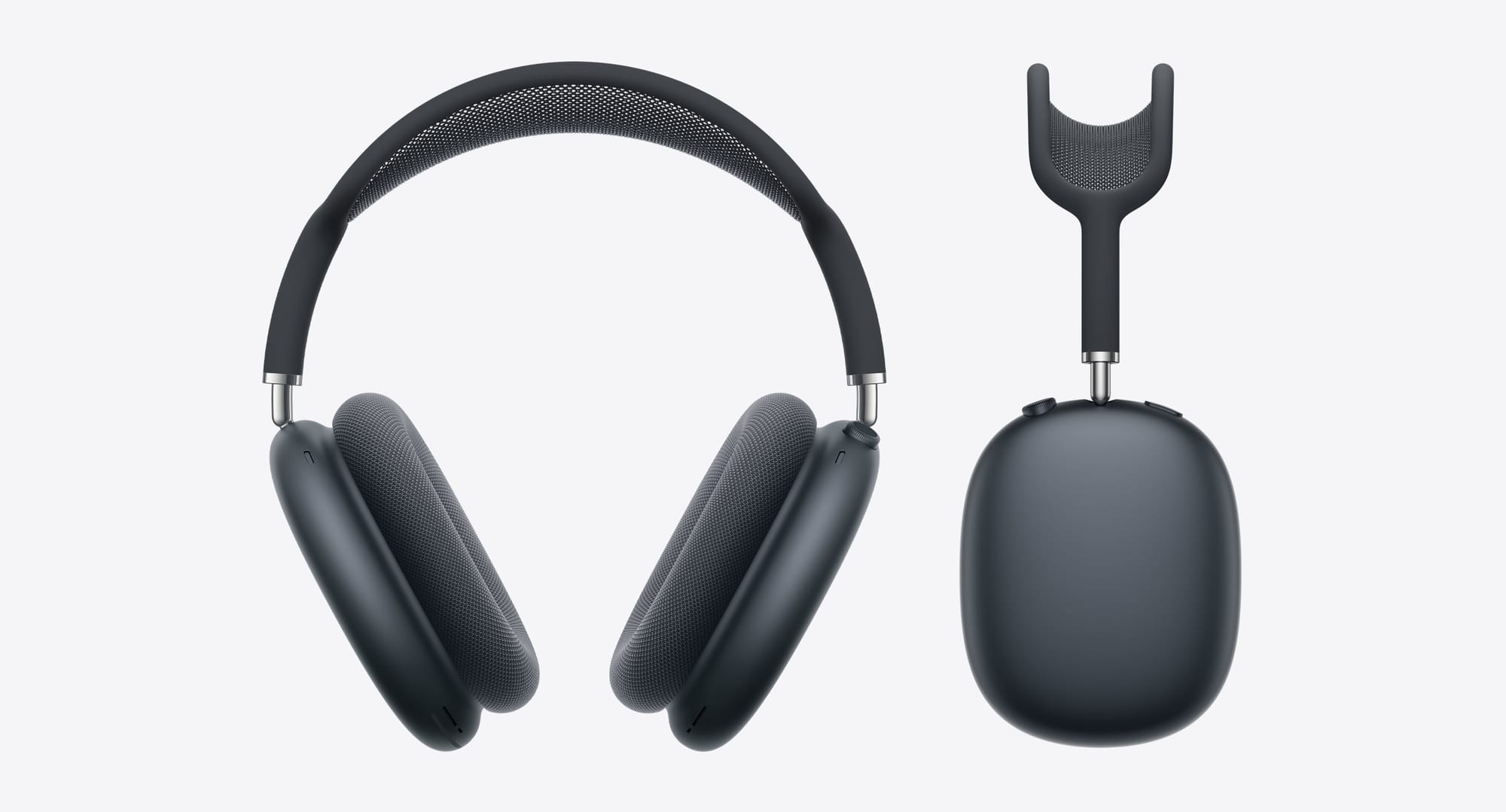

AirPods Max are Apple's most premium headphones, but out of the box they need some adjustments to reach their full potential. I'm going to walk you through the settings that matter, the maintenance routine that extends their lifespan, and the accessories that solve the biggest pain points Apple left unaddressed.
Get the Sound Right First
Personalized Spatial Audio makes a significant difference, but only if you set it up properly. Open Settings on your iPhone, tap your name, then scroll to AirPods Max. Tap "Personalized Spatial Audio" and follow the face scan process. Do this in good lighting and hold still—the system maps your ear shape to optimize audio placement.
Head Tracking can feel gimmicky in some apps but transforms video watching. Toggle it on for movies and off for music. You'll find this in Control Center: long-press the volume slider while wearing your Max, then tap Spatial Audio.
The Headphone Audio Level setting prevents hearing damage without sacrificing volume. Go to Settings → Sounds & Haptics → Headphone Safety. Enable "Reduce Loud Sounds" and set the threshold to 85 decibels. Your Max will automatically lower volume when audio exceeds this level, protecting your hearing during long listening sessions.
Fix the Battery Drain Problem
The Smart Case puts AirPods Max into ultra-low-power mode, but it's poorly designed and easy to misplace. You need a better solution.
A proper stand with built-in sleep mode activation gives you a permanent spot for your Max while preserving battery. The FARWAYVIEW AirPods Max Stand uses magnets to trigger sleep mode automatically when you place the headphones on it. The aluminum construction keeps them stable, and the silicone top protects the headband from warping under its own weight.
Affiliate disclosure: some links in this article are Amazon Associate links. If you buy through them, Next Level Mac may earn a small commission at no extra cost to you, and we only recommend products that genuinely bring value to your Apple setup.
The place to get the FARWAYVIEW AirPods Max Stand https://www.amazon.com/dp/B0D31KSMXX?tag=nextlevelmac-20&gbOpenExternal=1
Protect Them When You Travel
Apple's Smart Case offers minimal protection. The design leaves the headband exposed and provides no storage for cables. A hard-shell case makes travel actually feasible.
The ProCase Hard Case solves multiple problems at once. The EVA exterior absorbs impacts. Silicone ear cup covers prevent scratches on the metal grilles. A mesh pocket holds your charging cable and adapter. The case fits AirPods Max with or without the Smart Case inside, and the hand strap makes it easy to carry separately from your bag.
Use this link to get the ProCase Hard Case for AirPods Max https://www.amazon.com/dp/B08RNK4CDR?tag=nextlevelmac-20&gbOpenExternal=1
Maintain the Ear Cushions
The mesh ear cushions collect oils, sweat, and dust. Clean them weekly if you wear your Max daily, monthly if you're a lighter user.
Remove the cushions by pulling gently—the magnets release easily. Dampen a microfiber cloth with water and a tiny amount of mild soap. Wipe the mesh in circular motions, then wipe again with a clean damp cloth to remove soap residue. Let them air dry completely before reattaching.
Never submerge the cushions or use alcohol-based cleaners. Both damage the mesh coating and can weaken the magnets.
After six to twelve months of regular use, the cushions compress and lose their seal. You'll notice reduced bass response and weaker noise cancellation. Replace them before sound quality degrades too much.
The GEVO Upgraded Ear Cushions match the original mesh fabric design but add a silicone gel layer underneath for better long-session comfort. The enhanced magnets provide stronger attachment than stock cushions. Memory foam maintains its shape better than the original cushions, which means they'll last longer before needing another replacement.
Where to buy the GEVO Upgraded Ear Cushions https://www.amazon.com/dp/B0D3KSBVKG?tag=nextlevelmac-20&gbOpenExternal=1
Optimize Active Noise Cancellation
ANC effectiveness depends on proper fit. The ear cushions must form a complete seal around your ears. If you wear glasses, the arms break this seal and reduce noise cancellation significantly.
Position the glasses arms above the ear cushions rather than between the cushion and your head. This maintains most of the seal while still allowing comfortable glasses wear.
Adjust the headband for the right amount of clamping force. Too loose and you lose the seal. Too tight and you'll get headaches during extended wear. The right fit feels secure without pressure points.
Press firmly on Noise Control to cycle between ANC, Transparency, and Off. ANC works best for constant droning sounds like airplane engines or HVAC systems. Transparency mode excels in conversations or when you need environmental awareness. Off mode extends battery life when you don't need either feature.
Clean the Headband Properly
The mesh headband collects hair oils and sweat. Clean it monthly to prevent discoloration and odor.
Dampen a cloth with water and very mild soap. Wipe the entire headband, paying attention to where it contacts your head. Use a dry cloth to absorb excess moisture. Let the headband air dry completely before wearing again.
The stainless steel band underneath the mesh can develop fingerprints and smudges. Wipe it with a slightly damp cloth and dry immediately to prevent water spots.
Store your Max on a stand rather than letting them rest on their side. This prevents the headband mesh from developing permanent creases or flat spots.
Handle Condensation Issues
AirPods Max sometimes develop condensation inside the ear cups during temperature changes or extended high-volume use. You'll hear crackling sounds or notice the ANC behaving erratically.
Remove the ear cushions and let the Max air out for several hours. Store them in a room-temperature environment—not in a hot car or cold garage.
If condensation becomes frequent, reduce your volume level. High-volume playback generates more heat inside the drivers, increasing condensation risk.
Set Up Audio Sharing
Share audio from one device to two pairs of AirPods Max simultaneously. This works for watching movies together on an iPad or listening to the same playlist.
Play audio on your iPhone or iPad. Open Control Center and tap the AirPlay icon. Select "Share Audio" and hold the second pair of Max near your device. Follow the onscreen instructions to connect.
Each person can control their own volume independently using their Digital Crown. Audio Sharing works with any combination of AirPods Pro, AirPods, or AirPods Max.
Manage Multiple Device Connections
Automatic device switching moves your Max between iPhone, iPad, and Mac as you start playing audio on each device. This works most of the time but occasionally connects to the wrong device.
Disable automatic switching on devices where you rarely use your Max. Go to Bluetooth settings on that device, tap the info button next to AirPods Max, and set "Connect to This iPhone/iPad/Mac" to "When Last Connected to This iPhone/iPad/Mac."
This prevents your Max from switching away from your Mac when your iPhone receives a notification with sound.
Extend Battery Life
Twenty hours of listening time is the official rating, but real-world use depends on your settings and usage patterns.
Lower volume extends battery life significantly. You'll also protect your hearing. Find a comfortable volume level and stick with it rather than constantly adjusting.
Disable features you don't use. If you never use Spatial Audio, turn it off in Bluetooth settings. Your Max will use less processing power.
The ultra-low-power mode only activates in the Smart Case or on a compatible stand. AirPods Max left on a desk will drain to empty in about two days. Always use the case or stand when not wearing them.
Keep Firmware Updated
Apple releases firmware updates that improve sound quality, fix bugs, and add features. Updates install automatically when your Max are in the Smart Case, connected to power, and near your paired iPhone.
Check your current firmware version: go to Settings → Bluetooth on your iPhone, tap the info button next to AirPods Max, and look for "Version."
Force a firmware update by placing your Max in the Smart Case, connecting them to power via USB-C, and keeping your iPhone nearby with Bluetooth enabled. The update typically takes about 10 minutes.
Troubleshoot Connection Problems
If your Max won't connect, forget them from Bluetooth settings on all your devices. Then hold the noise control button and Digital Crown simultaneously for 15 seconds until the status light flashes amber, then white.
Pair them again by holding the Max near your iPhone with Bluetooth enabled. Tap "Connect" when the popup appears.
Persistent connection issues sometimes resolve by resetting network settings on your iPhone. This clears all Bluetooth pairings and WiFi passwords, so be prepared to re-enter those.
Handle the Digital Crown Carefully
The Digital Crown controls volume, playback, and call functions. Press once to play or pause. Press twice to skip forward. Press three times to skip backward. Turn the crown to adjust volume.
Dirt and debris can make the crown feel sticky or unresponsive. Clean around the crown with a dry microfiber cloth. Never use liquids directly on the crown mechanism.
If the crown becomes genuinely stuck, don't force it. This indicates internal debris and requires professional service from Apple.
Make Transparency Mode Work Better
Transparency mode uses external microphones to let environmental sound through while you wear your Max. The effect should sound natural, not electronic or amplified.
If voices sound tinny or artificial, clean the external microphone grilles. Use a dry soft-bristled brush to remove any debris. The microphones sit in small openings on the bottom of each ear cup.
Adjust Transparency volume in Settings → Accessibility → AirPods Max → Audio → Transparency. Some users prefer slightly reduced transparency to minimize harsh sounds like traffic noise while still hearing conversations.
The Reality About AirPods Max Limitations
No folding mechanism means AirPods Max take up significant space in any bag. The hard-shell case mentioned earlier mitigates this somewhat but doesn't solve the fundamental size issue. If packability is critical for your workflow, Max might not be the right choice.
The weight becomes noticeable during multi-hour listening sessions. The headband distributes weight reasonably well, but you'll feel fatigue that doesn't happen with lighter headphones. Take breaks every 90 minutes during extended use.
These limitations don't make Max bad headphones—they're excellent. But understanding what they can't do helps set realistic expectations and prevents disappointment.
Your Daily AirPods Max Routine
Every morning: Put your Max on the stand after use to preserve battery.
Every week: Wipe down ear cushions and headband with a damp cloth.
Every month: Deep clean the mesh components and inspect cushions for wear.
Every six months: Consider replacing ear cushions if you use your Max daily.
These simple habits keep your Max functioning optimally for years rather than months. The build quality supports long-term use, but only if you maintain them properly.

Related Posts
Play High-Res Lossless Audio on Your Mac
Nov 25, 2025
The Right Way to Clean Your AirPods Without Ruining Them
Oct 22, 2025
Prime Big Deal Days: 3 Apple buys that actually make sense
Oct 09, 2025