
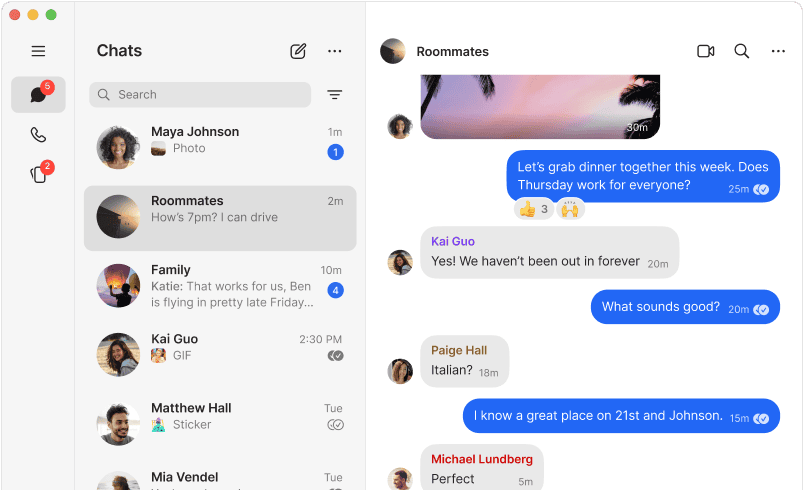

When you open Signal for the first time on your Mac, you see something surprising: no ads, no product pitches, no prompts to upgrade. This feels wrong because you're used to apps demanding something in return. Signal demands nothing. It keeps your messages private, syncs them across your iPhone and Mac, and runs as a nonprofit that can't be acquired by big tech.
Signal Desktop works on macOS, Windows, and Linux, but it needs Signal on your iPhone or iPad first. You link devices by scanning a QR code in the app, and conversations sync instantly. Once linked, you send messages, make voice and video calls, share files, and manage group chats from your Mac without touching your phone.
The desktop app runs independently now—no browser required. If you use Firefox or Safari instead of Chrome, this matters because earlier versions relied on Chrome. The current version installs as a standalone app, which means it starts faster and doesn't drain browser resources.
Affiliate disclosure: some links in this article are Amazon Associate links. If you buy through them, Next Level Mac may earn a small commission at no extra cost to you, and we only recommend products that genuinely bring value to your Apple setup.
End-to-end encryption protects every message and call using the Signal Protocol. This is the same encryption WhatsApp licensed years ago, but Signal goes further—it collects almost no metadata. The company stores your account creation date and the last time you connected. That's it. No contact lists, no message logs, no group membership data sits on Signal's servers.
Your Mac stores conversations locally in an encrypted database. If you lose your Mac or it gets stolen, the thief can't read your messages without your device password. Signal adds a second layer with disappearing messages—set a timer from five seconds to one week, and messages self-destruct after the recipient reads them.
Video and voice calls run over your internet connection, so you avoid carrier fees for international calls. Call quality depends on your network, but Signal's audio codecs handle varying bandwidth better than FaceTime in low-signal areas. The desktop app includes a headphone jack indicator, showing which audio device Signal uses for monitoring.
Here's where to get the FIFINE K669B USB Microphone https://www.amazon.com/dp/B06XCKGLTP?tag=nextlevelmac-20&gbOpenExternal=1
Group chats support up to 1,000 members now, which puts Signal ahead of WhatsApp's limit. You create groups, assign admin roles, set custom notifications, and restrict who can add members. Group calls work on Mac with up to 40 participants, and the interface shows active speakers in a grid layout that adapts as people join or leave.
Signal handles media differently than iMessage or Telegram. Photos and videos compress less aggressively, so image quality stays higher. The desktop app downloads media automatically by default, but you can change this in settings to save bandwidth. Files up to 10GB transfer through Signal without cloud storage, which keeps sensitive documents out of third-party servers.
The Mac app syncs stickers between devices, and you create custom sticker packs without coding. Signal treats stickers as encrypted data, so even your reaction GIFs stay private. You pin favorite chats to the top of your conversation list, mute notifications per chat, and set custom ringtones for specific contacts.
Where you can buy the CloudValley Webcam Cover https://www.amazon.com/dp/B079MCPJGH?tag=nextlevelmac-20&gbOpenExternal=1
Mac-specific features include keyboard shortcuts—press Command-slash to see the full list. You navigate conversations with Tab and Shift-Tab, which helps when you're switching between multiple chats quickly. The interface supports macOS accent colors, so Signal matches your system theme automatically.
Signal runs on the latest macOS releases and stays compatible with older versions down to macOS 10.13 High Sierra. Updates install automatically through the Mac App Store or Signal's own updater if you downloaded directly from their site. The nonprofit publishes release notes with every update, showing exactly what changed.
The desktop app includes a built-in passphrase lock that requires a separate password to open Signal, even if your Mac is already unlocked. This protects against shoulder surfing in coffee shops or coworking spaces. You enable it in Signal's privacy settings, and the app locks automatically after a set time.
Signal integrates with macOS notifications, showing message previews on your desktop unless you disable them. You control how much information appears—full message text, sender name only, or just a notification badge. When do not disturb mode activates on your Mac, Signal respects it and silences alerts.
The app supports drag-and-drop for files and images. You drag a photo from Finder directly into a Signal conversation, and it sends immediately. For multiple files, Signal creates a gallery preview before sending, so you review everything first. This works with PDFs, documents, and even folders.
Voice messages record through your Mac's microphone with one click. Signal converts them to compressed audio files that stay encrypted in transit. You play them back inside the app, and they self-destruct with the same timer as text messages if you enable disappearing messages for that conversation.
Signal runs as a 501(c)(3) nonprofit funded by grants and donations. There's no business model that requires selling your data or showing ads. The company publishes quarterly transparency reports showing government data requests—and Signal's response is always the same: they provide the only two data points they have, account creation and last connection date.
The desktop app requires your phone to stay connected during initial setup, but after linking, it works independently. If your iPhone dies or goes out of range, Mac conversations continue. New messages sync when your phone comes back online, and Signal resolves conflicts automatically by keeping the newest version of each message.
For Mac users who work in regulated industries or handle sensitive information, Signal offers a reliable alternative to consumer messaging apps that store everything in the cloud. The local storage model and minimal data collection make it compliant with HIPAA, GDPR, and similar privacy frameworks without requiring enterprise licensing.
Signal's open-source codebase means security researchers worldwide audit the code continuously. Vulnerabilities get patched fast, and the Signal Protocol itself has been tested by cryptographers at major universities. This transparency builds trust that closed-source apps can't match.
The Mac app supports multiple devices under one account now, so you link your iPad, a second Mac, or a Linux machine without creating separate accounts. Each device syncs independently, and you unlink devices remotely if one gets lost or stolen. Signal sends a notification to all linked devices when you add or remove one.
When you switch from iMessage or WhatsApp to Signal, the biggest adjustment is the lack of cloud backup. Signal doesn't back up conversations to iCloud or Google Drive by default. You create local backups manually on your Mac, which keeps control in your hands but requires more discipline than automatic cloud sync.
Signal Desktop feels fast because it doesn't track analytics or load remote assets. The app uses your Mac's CPU efficiently, and memory usage stays under 200MB even with dozens of active conversations. Compare this to Slack or Discord, which can consume gigabytes of RAM with similar workloads.
The Mac app receives updates frequently, often weekly during active development periods. Signal Foundation treats macOS as a first-class platform alongside iOS and Android, so Mac users don't wait months for features that shipped on mobile first. Desktop updates usually land within days of the mobile release.
For video calls, Signal Desktop uses your Mac's camera and microphone by default. You switch between multiple cameras if you have external webcams connected, and the settings menu shows audio levels for both input and output. This helps troubleshoot echo or feedback issues before they disrupt a call.
Signal respects macOS sandboxing, which limits what the app can access without permission. It requests access to your camera, microphone, and contacts explicitly, and you grant or deny each permission separately in System Preferences. This follows Apple's security model closely, unlike some cross-platform apps that work around macOS protections.
The interface adapts to macOS appearance settings, switching between light and dark mode based on your system preferences. You can override this and force one theme if you prefer, but automatic switching keeps Signal consistent with the rest of your Mac.
Signal Foundation develops the Mac app alongside the mobile versions in a unified codebase, which speeds up feature parity. When iOS gets a new capability, Mac usually follows within the same release cycle. This differs from apps like Telegram, where desktop features lag behind mobile by months or years.
The Mac app includes a media gallery that groups photos, videos, and documents by conversation. You browse everything you've shared with a contact without scrolling through the entire message history. The gallery supports quick actions like saving to Downloads or forwarding to another chat.
For users who need offline access, Signal Desktop caches recent messages locally. You read and compose messages without internet connection, and they queue for sending when your Mac reconnects. This works well on planes or in areas with spotty Wi-Fi, though you can't make calls or video chats offline.
Signal's notification system on Mac shows who sent a message and the first line of text, unless you disable previews in settings. You reply directly from the notification without opening the app, which saves time when you're focused on other work. Notifications respect focus modes in macOS Ventura and later, silencing automatically during scheduled downtime.
The desktop app supports screen sharing during video calls, letting you show your Mac's display to other participants. This works like Zoom or Microsoft Teams but with Signal's encryption protecting what you share. Screen sharing runs peer-to-peer when possible, falling back to Signal's servers only if direct connection fails.
Signal Desktop handles multiple accounts through separate profiles, though this requires creating distinct phone numbers for each account. You can't use one phone number across multiple Signal accounts like some apps allow. Each profile keeps its conversations, settings, and media separate.
For Mac users who value privacy without sacrificing convenience, Signal delivers both. The desktop app matches macOS conventions, syncs reliably with iPhone and iPad, and never compromises on encryption. It's messaging that respects you enough to leave you alone.

Related Posts
Is your Wi-Fi Speed Test LYING To You? Here's How to Find Out
Jan 17, 2026
Turn Your MacBook Into a Touchscreen With the Intricuit Magic Screen
Jan 07, 2026
Acorn 8 Image Editor for Mac: Professional Editing Made Simple
Jan 04, 2026