
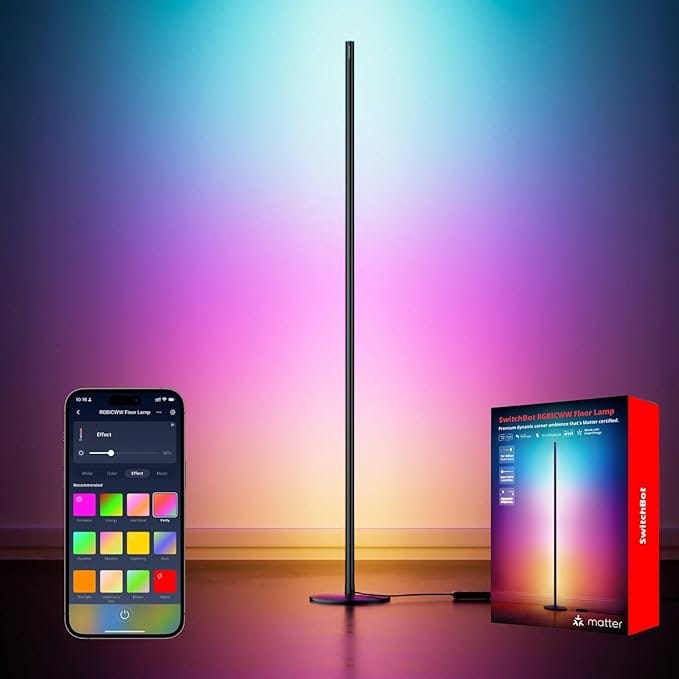

Smart lights that work with HomeKit usually need a bridge or hub sitting somewhere in your home, taking up an outlet and cluttering up your network. SwitchBot just changed that with their new Matter-enabled lighting lineup that connects directly to HomeKit over WiFi.
No bridge. No hub. Just plug in the light, scan the Matter code in the Home app, and you're done.
These lights use Matter over WiFi rather than Thread, which means they work with the WiFi network you already have running throughout your home. If you have an Apple TV or HomePod to act as a home hub, these lights will show up in HomeKit within seconds of setup.
The SwitchBot RGBICWW Floor Lamp stands out as the most versatile option in the lineup. It reaches 1.35 meters tall and puts out 1200 lumens, which is bright enough for actual task lighting rather than just mood setting. The RGBIC technology lets it display multiple colors at once across different segments of the lamp, so you can create gradients or flowing color effects that regular RGB lights cannot produce.
You can stand it vertically in a corner for a minimalist look, or lay it horizontally behind furniture to create indirect ambient lighting. The lamp adjusts from warm white at 2700K for evening relaxation all the way to cool white at 6500K for focused work. When you want color, you have 16 million options plus 26 dynamic presets that transition smoothly without looking jarring.
Here's where to get the SwitchBot RGBICWW Floor Lamp (Amazon Affiliate Link) https://www.amazon.com/dp/B0FGD8B6HH?tag=nextlevelmac-20&gbOpenExternal=1
For spaces where a floor lamp makes less sense, the SwitchBot RGBICWW Strip Light covers five meters and can be cut every 12.5 centimeters to fit exactly where you need it. The strip has an IP44 rating, so it handles light outdoor use under covered areas like patios or porches. The same segmented color control from the floor lamp works here too, making it ideal for backlighting a TV or highlighting architectural features with color that flows across the length of the strip.
Both the floor lamp and strip light sync with music, so the colors and brightness react to whatever you're playing. This feature works better for parties or movie nights than you might expect, creating an immersive environment that matches what's happening on screen or in your speakers.
The entire lineup integrates with HomeKit automations exactly like any other native accessory. You can set lights to turn on at sunset, change colors based on time of day, or include them in scenes that control multiple devices at once. Siri voice control works immediately without any setup beyond adding the light to your Home app.
Because these use Matter, they also work with Google Home and Alexa if you want multi-platform control. But for HomeKit users, the appeal is simpler: these lights just work the way HomeKit accessories should, without requiring you to install another company's app or create yet another account.
The SwitchBot Hub Mini Matter Enabled opens up even more possibilities if you want to bring other SwitchBot devices into HomeKit. While the lights work standalone, adding this hub lets you control SwitchBot curtains, locks, and contact sensors through HomeKit as well. The hub bridges those Bluetooth devices to Matter so they show up in your Home app right alongside the lights.
This is where you can buy the SwitchBot Hub Mini Matter Enabled Hub (Amazon Affiliate Link) https://www.amazon.com/dp/B0CXJC5ZZT?tag=nextlevelmac-20&gbOpenExternal=1
What makes this lighting series particularly useful for HomeKit users is that it removes friction from the smart home experience. You don't manage these lights in a separate app unless you want to access advanced features like music sync modes. For everyday use, they live entirely in the Home app where you already control everything else.
The setup process takes less time than opening the box. Plug in the light, open the Home app, tap the plus button, scan the Matter code on the device or its packaging, and assign it to a room. The light appears instantly and responds to commands without delay.
SwitchBot priced these lights competitively with other Matter-enabled options on the market, and the fact that they skip the hub requirement makes them even better value. You're not spending extra money on infrastructure that just sits in a closet. The lights themselves are the entire system.
For anyone building out a HomeKit setup or looking to add better lighting without dealing with bridges and hubs, this SwitchBot lineup deserves attention. The lights perform well, integrate cleanly with HomeKit, and work exactly the way smart home accessories should work in the first place.

Related Posts
Repurpose Your Old iPad: Ultimate Smart Home Dashboard Guide
Dec 07, 2025
Fix Apple Home Wi-Fi Lag: Router Settings That Work (2026)
Dec 01, 2025
Unlock Your Door With Your Watch: The Best Apple Home Key Smart Locks
Nov 29, 2025