

You probably interact with your keyboard more than any other object in your life. You touch it thousands of times a day, pouring your work, your texts, and your ideas through it. Yet most Mac users settle for the flat, lifeless tapping of a laptop keyboard or the standard Magic Keyboard without ever questioning if it could be better.
Switching to a mechanical keyboard isn't just about nostalgia or clicking noises. It is about ergonomics, precision, and bringing a tangible sense of satisfaction to the work you do. When every keystroke has travel and feedback, you type with more confidence. You make fewer errors because your fingers know exactly when a key has been actuated. And, frankly, it just feels better.
For a long time, mechanical keyboards were a messy world of Windows-centric layouts and clunky designs that looked out of place on a clean Mac desk. That has changed. You can now find high-quality mechanical boards that are built for macOS from the ground up, with the correct Option and Command keys, beautiful aluminum cases, and wireless connectivity that just works.
Affiliate disclosure: some links in this article are Amazon Associate links. If you buy through them, Next Level Mac may earn a small commission at no extra cost to you, and we only recommend products that genuinely bring value to your Apple setup.
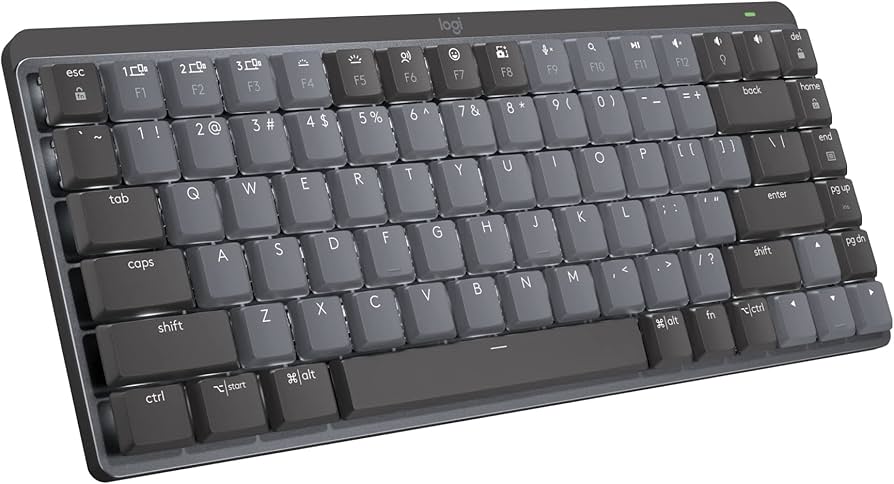
The Safe Bet: Logitech MX Mechanical Mini for Mac
Transitioning from a Magic Keyboard or a MacBook to a tall, chunky mechanical keyboard can feel jarring. You might worry about the noise or the height. The Logitech MX Mechanical Mini is designed to bridge that gap perfectly.
It uses low-profile switches, meaning the keys are much shorter than a traditional mechanical board. You get the satisfying tactile bump and the travel, but your hands stay closer to the desk, so you don't need a wrist rest. It is quiet enough for an office but tactile enough to feel responsive.
The best part is the native Mac integration. It connects instantly via Bluetooth or the Logi Bolt receiver, and the keys are strictly Mac-labeled—no confusing "Alt" or "Win" symbols cluttering the bottom row. It also features smart backlighting that lights up when your hands approach and adjusts to the room's brightness automatically.
Here’s where to get the Logitech MX Mechanical Mini for Mac (Amazon Affiliate Link): https://www.amazon.com/dp/B0B7XW2L8M?tag=nextlevelmac-20&gbOpenExternal=1
The Laptop Feel (But Better): NuPhy Air75 V2
Some people love the flat profile of a laptop keyboard but hate the "mushy" bottom-out feel. For a keyboard that can literally sit on top of your MacBook's built-in keyboard without pressing the keys underneath (thanks to its designed feet), the NuPhy Air75 V2 is a brilliant choice.
This keyboard has taken the Mac community by storm because it packs serious enthusiast features into a slim, travel-friendly body. It uses QMK/VIA firmware, which sounds technical but just means you can completely customize every key to do whatever you want—perfect for productivity shortcuts.
It comes with Mac keycaps installed by default and works wirelessly or wired. The typing feel is snappy and crisp, offering significantly more feedback than an Apple keyboard without the bulk. Plus, the design is fun, with subtle pops of color on the keycaps that look great next to a Space Gray or Silver MacBook.
Where you can buy the NuPhy Air75 V2 Portable Mechanical Keyboard (Amazon Affiliate Link): https://www.amazon.com/dp/B0CJBZ8M15?tag=nextlevelmac-20&gbOpenExternal=1
The Deep End: Keychron Q1 Pro
Stepping into the world of premium, custom-grade keyboards starts with the Keychron Q1 Pro. This thing is built like a tank, with a heavy CNC-machined aluminum body that stays planted on your desk.
It features a "gasket mount" design. This means the internal plate is suspended on soft gaskets rather than being screwed directly into the metal case. When you type, the whole key bed has a tiny bit of flex and cushion, making it incredibly comfortable for long writing sessions.
The sound is deeper and more solid than the plastic keyboards you are used to. It is fully wireless, supports Mac layout out of the box, and has a programmable knob that you can use for volume, zoom, or scrolling. It is a statement piece for your desk that feels like a precision instrument.
This is where to buy the Keychron Q1 Pro Wireless Custom Mechanical Keyboard (Amazon Affiliate Link): https://www.amazon.com/dp/B0C6K4H9K9?tag=nextlevelmac-20&gbOpenExternal=1
Why This Upgrade Matters
Upgrading your keyboard is one of the highest value changes you can make to your setup. Unlike a faster processor or a slightly better screen, you feel the difference of a good keyboard every single second you are using your computer.
Whether you go for the sleek practicality of the Logitech, the portable versatility of the NuPhy, or the premium weight of the Keychron, you are investing in your own comfort. Your fingers will thank you.

Related Posts
Finder Quick Actions in macOS Tahoe Automate File Tasks Instantly
Jan 12, 2026
Master Pixelmator Pro: The Ultimate Mac Photo Editor Guide
Dec 10, 2025
Keka: The Best Mac File Compressor
Dec 10, 2025